Kotlin Visibility Modifiers
My name is Ronnie & a fellow geek like you😎. I am passionately tech curious.
I blog, tweet, write, code, vlog, discuss and eat anything about tech.
😍 Feel Free To Connect 😍
Hey buddy👋, welcome back to my blog. Today, we shall continue from where we stopped in the last tutorial in this series.
What are Visibility Modifiers❓
 Visibility modifiers are keywords that set the visibility (accessibility) of classes, objects, interface, constructors, functions, properties and their setters. (You cannot set visibility modifier of getters as they always take the same visibility as that of the property.)
Visibility modifiers restrict the access of classes, interfaces, functions, properties, constructors etc. to a certain level.
🔹Types of Modifiers
Most programming languages have three forms of access modifiers, which are Public, Protected and Private in a class just like Python.
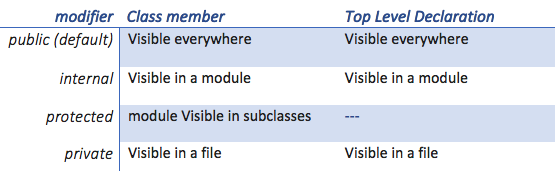
There are however four visibility modifiers in Kotlin: private, protected, internal, and public. The default visibility is public.
🔹 Public Access Modifier:
A public modifier is accessible from everywhere in the project. It is a default modifier in both Kotlin & Python.
If any class, interface etc. are not specified with any access modifier then that class, interface etc. are used in public scope.
Kotlin Example:
public class Example{
}
class Demo{
}
public fun hello()
fun demo()
public val x = 5
val y = 10
🔹 Protected Access Modifier:
A protected modifier with class or interface allows visibility to its class or subclass only. A protected declaration (when overridden) in its subclass is also protected modifier unless it is explicitly changed.
open class Base{
    protected val i = 0
}

class Derived : Base(){

    fun getValue() : Int
    {
        return i
    }
}
The open keyword means “open for extension“: it allows others to inherit from this class. We shall look at it in the next tutorial.
Note 1: In Kotlin, protected modifier cannot be declared at top-level.
Note 2: If you override a protected member in the derived class without specifying its visibility, its visibility will also be protected.
Overriding of protected types
open class Base{
  open protected val i = 5
}
class Another : Base(){
    fun getValue() : Int
    {
        return i
    }
    override val i =10
}
In Python, data members of a class are declared protected by adding a single underscore _ symbol before the data member of that class. Read More here
🔹 Private Access Modifier:
The members of a class that are declared private are accessible within the class only, private access modifier is the most secure access modifier.
A private package can be accessible within that specific file.
private class Example {
    private val x = 1
     private valdoSomething() {
    }
}
In Python, data members of a class are declared private by adding a double underscore __ symbol before the data member of that class.
🔹Internal Access Modifier
The internal modifiers are newly added in Kotlin, it is not available in Python & most languages.
Declaring anything makes that field marked as internal field. The internal modifier makes the field visible only inside the module in which it is implemented.
internal class Example{
    internal val x = 5
    internal fun getValue(){

    }
}
internal val y = 10
🔹Summary
Conclusion
We have seen all the four types of visibility modifiers in Kotlin & also learnt the corresponding types in Python. It is possible you can create a program that can contain all the types at a go.
In case of further reading: Please visit official docs for all the changes. Also, you can Read More Here
To use a visible top-level declaration from another package, you should import it.
Please consider subscribing, sharing or liking this if you have enjoyed my simple article
Ronnie Atuhaire 😎