# Top 30 CMD Commands For Windows
Hi there👋, there are a million reasons why everyone not only developers should learn to use the terminal to execute stuff as opposed to using the GUI base execution and I won't go into details but you can read more from [here.](http://www.hongkiat.com/blog/developers-command-line/)
This list is going to be useful for those using windows machines to code. Enjoy!
### What is a terminal?
A terminal is simply a text-based interface to the computer. In a terminal, you can type commands, manipulate files, execute programs, and open documents.
When working in a terminal, the current directory is called your working directory (```cwd```). A terminal usually starts in the top-level directory of your account.

Terminals, also known as command lines or consoles, allow us to accomplish and automate tasks on a computer without the use of a graphical user interface.
The terminal is the actual interface to the console that you can type and execute text-based commands.
Keep in mind that you cannot access source code through a terminal. The terminal is used to execute commands that allow you to do a certain task.

The advantages of a command-line interface are greater control of an ```OS``` or application; faster management of many operating systems.
Just basic command-line interface knowledge can help with troubleshooting, such as network connection issues.
Sometimes they are referred to as ```CLIs```, ```command-line interfaces```
On ```unix```, the command processors are called ```shells’``` and there are different languages among them. A generic term is ```shell programming```
On Windows, the traditional command-line took programs in files with ```.bat``` extensions, and those are called ```batch scripts``` or ```batch programs```

The Command shell was the first shell built into Windows to automate routine tasks, like user account management or nightly backups, with batch (.bat) files.
In Linux, much of your work occurs from a command prompt, also known as the ```shell```, or ```BASH``` (Bourne-Again Shell). The ```shell``` interpretes your commands and passes them to the operating system for execution.

📌 Windows is either ```command```/```batch shell``` or ```Powershell```
📌 Linux/Unix is either ```bash``` or ```csh (C shell)``` or ```ksh (Kourne shell)```.
Windows ```PowerShell``` vs ```Command Prompt```
Command prompt or ```cmd``` is a default application of windows that are used to interact with any windows objects in the windows ```os```.
![[removal.ai]_tmp-61b735bcc31e0.png](https://cdn.hashnode.com/res/hashnode/image/upload/v1639396811327/a97oimjt6G.png)
PowerShell is a more advanced version of ```cmd```. It is not only an interface but also a scripting language that is used to carry out administrative tasks more easily.
Find a list of all Windows commands from the official [docs](https://docs.microsoft.com/en-us/windows-server/administration/windows-commands/windows-commands)
I will be sharing the top 30 useful ones in no particular order from that [list](https://docs.microsoft.com/en-us/windows-server/administration/windows-commands/windows-commands) and the ones I believe you will encounter most or for your productivity.
To get started: Hit ```Windows``` + ```R``` Buttons & Type ```cmd```
You can open the Command Prompt by pressing ⊞ Win + R to open the Run box and typing cmd .

✨**```ping```**: Send Test Packets
A ping (Packet Internet or Inter-Network Groper) is a basic Internet program that allows a user to test and verify if a particular destination IP address exists and can accept requests in computer network administration.
```
ping google.com
```

Ping measures the round-trip time for messages sent from the originating host to a destination computer that are echoed back to the source.
✨**```tasklist``` **:
You can use the tasklist command to provide a current list of all tasks running on your PC. Though somewhat redundant with Task Manager, the command may sometimes find tasks hidden from view in that utility.

```tasklist -svc``` shows services related to each task, use tasklist ```-v``` to obtain more detail on each task, and ```tasklist -m``` will locate DLL files associated with active tasks.
✨**```tracert```**: Trace Route
The ```tracert``` command is a Command Prompt command that's used to show several details about the path that a packet takes from the computer to the destination host.
The command stands for "Trace Route", which sends packets out to a remote destination (server or website) and provides you with all of the following information:
📌 Number of hops (intermediate servers) before getting to the destination
📌 Time it takes to get to each hop
📌 The IP and sometimes the name of each hop
✨**```prompt ```**:
Would you like to customize your command prompt to include instructions or certain information? With the prompt command, you can!
```
prompt Your wish is my command:
```
Type "prompt" to reset your command prompt to default settings or just restart the command prompt. Unfortunately, these settings aren't permanent.
✨**```netstat``` **: Network Statistics
Concerned that you could have malware running on your computer that’s connecting to internet locations without you knowing about it?

If you run a ```netstat``` command in the command prompt, you can get a list of all active TCP connections from your computer.
✨**```start``` **:
Start command can be used to run a command/batch file in another command window or to launch an application from the command line.
```
start brave
```
The above command will open the brave browser if you have it installed already.
✨**```assoc```**: Association
```Assoc``` is command (internal) found inside Windows Command Processor Command Prompt, that allows for file extension to file type association.

Most files in Windows are associated with a specific program that is assigned to open the file by default. At times, remembering these associations can become confusing.
✨**```cd```** :(change directory)
It is a command used to switch directories in MS-DOS and the Windows command line.
```
cd ..
cd python
```
✨**```Nslookup```** :
Nslookup is an MS-DOS utility that enables a user to look up the IP address of a domain or host on a network.
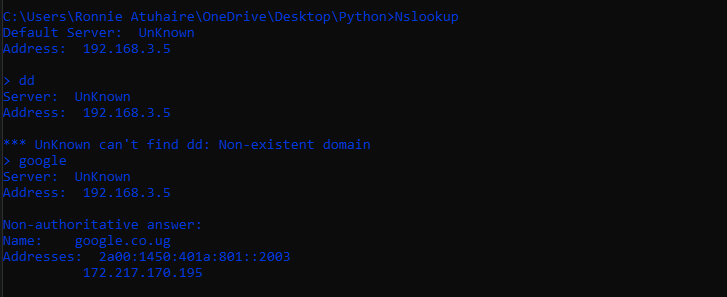
The ```nslookup``` command can also perform a reverse lookup using an IP address to find the domain or host associated with that IP address.
✨**```cipher```**:
Cipher.exe is a built-in command-line tool in the Windows operating system that can be used to encrypt or decrypt data on NTFS drives.
Deleting files on a mechanical hard drive doesn't really delete them at all. Instead, it marks the files as no longer accessible and the space they took up as free.

The command does not overwrite undeleted data, so you will not wipe out the files you need by running this command.
✨**```copy```**:
The copy command is used for complete files, if you want to copy a directory, or multiple directories containing files, use the robocopy or xcopy command.
```
copy *.txt c:\
```
In the example above, we are using a wildcard to copy all .txt files (multiple files) from the current directory to the c:\ root directory.
✨**```Hostname```**:

A very simple command that displays the hostname of your machine. This is much quicker than going to the control panel>system route.
✨**```ipconfig``` **: IP Configuration
Using this command in the CMD command prompt returns detailed information about your current network adapter connection including:
📌 Current IP Address
📌 Subnet Mask
📌 Default Gateway IP
📌 Current domain
✨**```getmac```**:
Another very simple command that shows the MAC address of your network interfaces
✨**```cls``` **:
Cluttered up your command prompt window trying out all the commands above? The ```cls``` command allows users to clear all the contents on the screen and leave only a prompt.
✨**```taskkill```**:
Tasks that appear in the tasklist command will have an executable and process ID (a four- or five-digit number) associated with them.
You can force stop a program using ```taskkill -im``` followed by the executable's name, or ```taskkill -pid``` followed by the process ID.
Again, this is a bit redundant with Task Manager, but you can use it to kill otherwise unresponsive or hidden programs.
✨**```schtasks```**: Schedule Tasks
Windows comes with a wizard for creating scheduled tasks. For example, maybe you have a ```BAT``` file stored on ```C:\temp``` that you want to run every day at noon.
```
SCHTASKS /Create /SC HOURLY /MO 12 /TR Example /TN c:\temp\File1.bat
```
✨**```PathPing```**:
This is a more advanced version of ping that's useful if there are multiple routers between your PC and the device you're testing.

Like ping, you use this command by typing ``` pathping``` followed by the ``` IP address``` , but unlike ``` ping``` , ``` pathping``` also relays some information about the route the test packets take.
✨**``` chkdsk``` **: Check Disk
Chkdsk examines disk space and disk use and provides a status report specific to each file system.
This command checks for things like:
📌 File fragmentation
📌 Disk errors
📌 Bad sectors
✨**``` SFC``` **: System File Checker
System File Checker (SFC) is a utility in Microsoft Windows that allows users to scan for and restore corrupted Windows system files.

You need to launch ``` CMD``` as administrator (right-click and choose Run as Administrator).
Typing ``` SFC /SCANNOW``` will check the integrity of all protected system files. If a problem is found, the files will be repaired with backed-up system files.
✨**``` rmdir ``` **: Remove Directory
Deletes a directory. The ``` rmdir``` command can also run from the Windows Recovery Console, using different parameters.
it usually removes empty directories on various operating systems. Use the ``` rmdir /s``` command to delete a folder and all its subfolders.
✨**```shutdown``` **:
The ```shutdown``` command is a pretty versatile command that lets you shut down the computer but control the behaviour of that shutdown.
Typing ``` shutdown /i ``` from the command prompt will initiate a shutdown, but it’ll upon a GUI to give the user an option on whether to restart or do a full shutdown.
```
shutdown /r /t 120
```
The``` /t``` option is used to specify delay time in seconds. In the following reboot example, we will restart the system after 120 seconds.
✨**``` powercfg``` **: Power Configuration
[powercfg](https://docs.microsoft.com/en-us/windows-hardware/design/device-experiences/powercfg-command-line-options) (executable name powercfg.exe ) is a command-line utility that is used from an elevated Windows Command Prompt to control all configurable power system settings, including hardware-specific configurations that are not configurable through the Control Panel, on a per-user basis.
Run the command prompt as an administrator and type ```powercfg – energy``` to get a full power efficiency report if you are frustrated with how quickly your laptop seems to run out of power.
✨**```mkdir```** : Make Directory
Creates a new directory on the specified path. If directories don’t already exist on the path, ```mkdir``` creates them automatically.
You can also use the ```md``` command.
```
mkdir python
```
✨**```diskpart```**:
The [diskpart](https://docs.microsoft.com/en-us/windows-server/administration/windows-commands/diskpart) command interpreter helps you manage your computer's drives (disks, partitions, volumes, or virtual hard disks).
Diskpart is a separate suite of commands that runs in the command window in its own shell. It is opened by first entering the command ```diskpart```
✨**```tree```**:
Graphically displays the directory structure of a drive or path. With the ```/F``` parameter, all files in the folders are also listed out.

```/A``` also ensures that only ASCII characters are used for the graphical representation.
\
✨**```Format```**:
The format command is a Command Prompt command used to format a specified partition on a hard drive (internal or external), floppy disk, or flash drive to a specified file system.
The command below will quick-format the D drive with the exFAT file system, with an allocation unit size of 2048 bytes, and rename the volume to "label" (without the quotes).
```
format D: /Q /FS:exFAT /A:2048 /V:label
```
You'll need Administrator rights to use this command. Be sure you specify the volume you want to format, followed by the desired parameters.
✨**```&&```** :
Adding ```&&``` between commands will let you enter multiple lines at once to be executed in succession. Example:
```
tasklist && netstat -b
```
#### Creating Files
✨**```echo```**:
Echo is a command that outputs the strings that are passed to it as arguments. It can also be used to create files like this:
```
echo >> foo.py import pandas
```
```
echo #This is a sample python file > sample.py
```
✨**```fsutil```**:
The Fsutil fsinfo command lists all drives, querying a drive type, query disk information, querying specific NTFS drive information, or file system statistics queries.
It can also create files
The below command will create a file called sample.txt in the current working directory that’s 1KB in size.
```
fsutil file createnew sample.txt 1000
```
You can also specify the directory like this
```
fsutil file createNew C:\testfile.txt 1000
```
In the Windows Command shell, type is a built in command which displays the contents of a text file.
```
type scripty.py
```
```
type nul > filename. txt
```
The above command now creates an empty ```txt``` file

**Some Tips:
**
🛠 Whenever you are dealing with a file or directory with a space, it must be surrounded by quotes. Otherwise, you'll get the ```Getting 'The syntax of the command is incorrect``` error.
🛠 Most Linux commands like ```cat```, ```ls``` etc can work while using Windows Powershell
🛠 You can customise the colour of your cmd just like mine, I will tackle this in another tutorial.
🛠 Most commands in Windows are not case sensitive!
🛠 Some Commands above may require admin rights
🛠 There is a ```help``` command that can indeed aid you in what you are trying to achieve.
I am currently having a dual-boot on my machine but would love to interact more with Linux and this is very good for devs to master and learn a lot besides the many advantages Linux and UNIX machines bring to the table.
That's It!
If you enjoyed reading, consider subscribing and reacting to this with love by sharing, commenting and any criticism is much welcome.
📢Follow me on [Twitter](https://twitter.com/intent/follow?screen_name=AfroBoyUg) :
**Ronnie Atuhaire**