# Sending Emails With Python
Hello there👋, have you ever wanted to automatically send emails programmatically? Today, we shall see how to achieve this in just a few lines of code.
We shall be using the SMTP protocol client to send emails to Gmail Server particularly.
The ```smtplib``` module defines an SMTP client session object that can be used to send mail to any Internet machine with an ```SMTP``` or ```ESMTP``` listener daemon.
[Read more](https://docs.python.org/3/library/smtplib.html)
We shall also use the email module. The [email package](https://docs.python.org/3/library/email.html) is a library for managing email messages.
#### 🔸 Code
Let's begin by importing the necessary modules in a newly created ```py``` file.
```
import smtplib
from email.message import EmailMessage
```
Let's initialise the message object;
```
msg = EmailMessage()
```
Now let's populate our message object with the message information.
```
msg['From'] = "sender@gmail.com"
msg['To'] = "recipient@gmail.com"
msg['Subject'] = "Sending Emails With Python!"
message = msg.set_content("We are using Python >>")
```
We finally initialise our mail client;
```
server = smtplib.SMTP_SSL('smtp.gmail.com', 465)
server.login("yourmail@gmail.com", "yourpassword")
server.send_message(msg)
server.quit()
```
We start by creating our own SMTP server on port 465 and passing in real Gmail account credentials.
Please Note:
You will need to update your Gmail account settings to enable connection and use with less secure accounts. It is a service that Google may soon deprecate or take off for security reasons.
This setting is not available for accounts with 2-Step Verification.

Visit Account Settings [page](https://myaccount.google.com/lesssecureapps?) to get started
Let's finally add a ``` print()``` statement for a successful transaction and wrap our entire code in a function to look like this;
```
import smtplib
from email.message import EmailMessage
def send_email(send_email_to):
msg = EmailMessage()
msg['From'] = "sender@gmail.com"
msg['To'] = send_email_to
msg['Subject'] = "Sending Emails With Python!"
message = msg.set_content("We are using Python >>")
# Send the message via our own SMTP server.
server = smtplib.SMTP_SSL('smtp.gmail.com', 465)
server.login("yourmail@gmail.com", "yourpassword")
server.send_message(msg)
server.quit()
# prints to your console
print("Successfully sent email to %s:" % (msg['To']))
```
Notice, I added a ``` send_email_to``` variable that will be passed as an argument every time the ``` send_email ``` function is called.
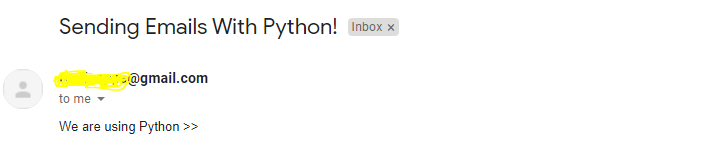
So, if we used the real credentials and ran our file by calling the function ``` send_email("recipientmail@gmail.com")```, we would get;
GitHub [Repo](https://github.com/Ronlin1/Python-Mail-Sender):
#### 🔸 Conclusion
Once again, hope you learned something today from my little closet.
Please consider subscribing or following me for related content, especially about Tech, Python & General Programming.
You can show extra love by buying me a coffee to support this free content and I am also open to partnerships, technical writing roles, collaborations and Python-related training or roles.
 📢 You can also follow me on [Twitter](https://twitter.com/intent/follow?screen_name=AfroBoyUg) : ♥ ♥ Waiting for you! 🙂