# Google Chrome Flags; How To Enable Dark Mode

<!-- wp:paragraph -->
<p>
As a developer, I often find myself looking out for dark mode on every website I visit n the internet and this can be tiresome because some websites do not support that dark theme.

Over the years, Chrome has largely dominated the browser industry. Google Chrome is a fast, easy-to-use, and secure web browser. In this article, I will show you how to enable the default dark mode theme without installing any extension. </p>
<!-- /wp:paragraph -->

<!-- wp:paragraph -->
<p>Dark Mode is a systemwide appearance setting that uses a dark color palette to provide a comfortable viewing experience tailored for low-light environments.&nbsp; There are some more general benefits to having a dark mode option, as it can reduce eye strain in low lighting conditions, reduce battery life and create a better viewing experience.</p>
<!-- /wp:paragraph -->

<!-- wp:image -->
<figure class="wp-block-image"><img src="https://lh5.googleusercontent.com/_PwELq0hvwUEF8K8LrPY7z6IrCh-Vu1MfOLNNDL6PyoJhXq7MhgNFe38RO4PKk5hhzQUYNIgPw9nxoSAkZm2J8OQdRZL53iJURu40FnlMQlH_Tqw2MNYSxYPcBNsm4ic13-kY7FY-6_CHpVUF1CYdx4" alt=""/></figure>
<!-- /wp:image -->

<!-- wp:paragraph -->
<p>Dark mode doesn't directly reduce eye strain, but it can offer some relief than a very bright screen. So let's get started.</p>
<!-- /wp:paragraph -->

<!-- wp:paragraph -->
<p>In the address bar or search bar; Type chrome://flags and press enter.</p>
<!-- /wp:paragraph -->

<!-- wp:image -->
<figure class="wp-block-image"><img src="https://lh4.googleusercontent.com/g4xyNPhEbiR-XzTMaS3LqpLHz1qubXJXOoXWnTDycxfnGQKtIohHdihoHrG_A707vTLx2Li1hjaNefSmLU4g1EbpLAOkBLKzaYxesCqK77yCFeSaMwepcYorK4w0ZypHNXBqph7fqx7mckUhgVZI9zo" alt=""/></figure>
<!-- /wp:image -->

<!-- wp:paragraph -->
<p>Chrome Flags are experimental features that aren't part of the default Chrome experience. Some are focused on users that eventually find their way into the public version of Chrome. Others are for developers and become part of Chrome Developer Tools once released.</p>
<!-- /wp:paragraph -->

<!-- wp:paragraph -->
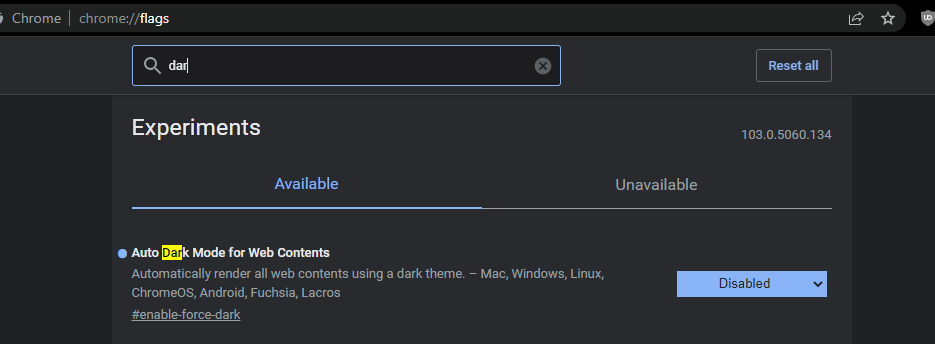
<p>Now type dark mode in the search query;</p>
<!-- /wp:paragraph -->

<!-- wp:image -->
<figure class="wp-block-image"><img src="https://lh5.googleusercontent.com/a4-vgjZ_V1bAh3OFSyQ0kPvsY2BZ0K4lngkXZPmQKWGFpBmxwRS0VJCL9XL7AoAV2i8Fjy58kEvH8wK0iC2u0CASOsEbJAoPtKchCnCt14JWtvQhY0wBg4RVheOIvVEcvgrf3X1XMMXLNp9SAF2fOQg" alt=""/></figure>
<!-- /wp:image -->

<!-- wp:paragraph -->
<p>Find Auto Dark Mode for Web Contents</p>
<!-- /wp:paragraph -->

<!-- wp:image -->
<figure class="wp-block-image"><img src="https://lh5.googleusercontent.com/MLuOTyIL4m0o4S3vqEdpS0ffp_qLTlhqMC8zeD2fgerp2-RcW6vuOFan5b-mWRbqQUSNCrzvl4myXOWLtwDjvQB32DLGA3pEJgmB39nR28vInCykd_R_SNQ1hZg-zeYTmf1uBUXkQ4YxnE8lIdJRst8" alt=""/></figure>
<!-- /wp:image -->

<!-- wp:paragraph -->
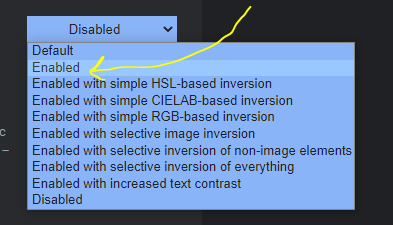
<p>In the dropdown, select Enabled</p>
<!-- /wp:paragraph -->

<center>
<!-- wp:image {"width":468,"height":268} -->
<figure class="wp-block-image is-resized"><img src="https://lh6.googleusercontent.com/74hA7iOidc3LzkUkDEoYYernAtgXu8NlvaQuOpQvC6EeEUrSPYwJNLPlSmC4e4zfybvfahJxRapMo0rqz_9KMukObvtbUm4ohIiMXVAahzbEyX6ySuEXnwVUTqXrNV45-I_y3eI4eiMGry01Vt-ou-8" alt="" width="468" height="268"/></figure>
<!-- /wp:image -->
</center>

<!-- wp:paragraph -->
<p>You will need to relaunch the browser in order to have changes affected.</p>
<!-- /wp:paragraph -->

<!-- wp:paragraph -->
<p>That's it, you have enabled all web contents to de dark by default and what this means is that you can read web pages in dark mode by default even if the website does not have that toggle or theme switch button.</p>
<!-- /wp:paragraph -->

#### 🌟 Conclusion
Once again, hope you learned something today from my little closet.

Please consider subscribing or following me for related content, especially about Tech, Python & General Programming.


![image.png](https://cdn.hashnode.com/res/hashnode/image/upload/v1657097866062/lOsaHYsYe.png align="left")

You can show extra love by buying me a coffee to support this free content and I am also open to partnerships, technical writing roles, collaborations, and Python-related training or roles.

<center>

<a href="https://www.buymeacoffee.com/RonnieAtuhaire" target="_blank"><img src="https://cdn.buymeacoffee.com/buttons/default-orange.png" alt="Buy Ronnie A Coffee" height="41" width="174"></a>

📢 You can also follow me on [Twitter](https://twitter.com/intent/follow?screen_name=AfroBoyUg) : ♥ ♥  Waiting for you! 🙂